


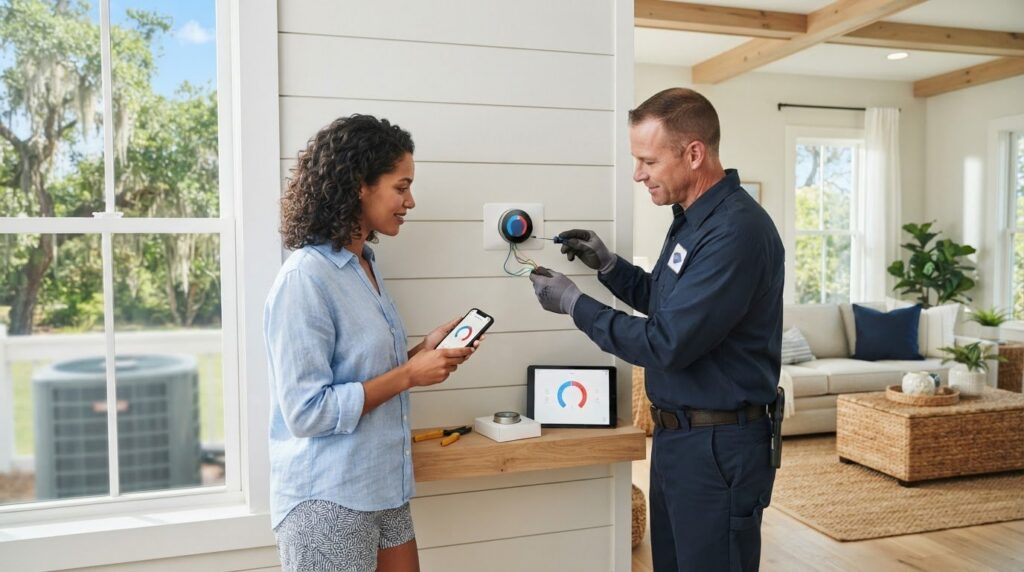
What if the most important part of a smart thermostat installation happens before you touch a wire? For smart thermostat setup mount pleasant homeowners should start by checking whether the device matches their heating and cooling equipment. It’s understandable to feel unsure about unfamiliar wire labels, the thermostat base, or whether a missing C-wire could cause trouble.
A careful setup can help you avoid guesswork and make comfort easier to manage. This guide walks you through checking compatibility, preparing and installing the thermostat safely, connecting it to Wi-Fi and its app, and setting schedules that fit your household. You’ll also learn when it makes sense to pause and ask an HVAC professional for help with wiring or system configuration.
Mount Pleasant’s humid coastal climate and long cooling season make practical settings especially useful. The steps ahead will help you get started with confidence, then fine-tune schedules and comfort settings for the changing seasons. If the wiring or compatibility doesn’t look clear, a local HVAC technician can help you find the right next step without assuming you need a new system.
Key Takeaways
- Before choosing a thermostat, compare its requirements with your HVAC system, wiring, Wi-Fi, and app support.
- For smart thermostat setup mount pleasant homeowners can use a clear sequence to document connections, install the device, configure it, and test operation.
- Build a simple schedule around your household’s daily routine, then adjust cooling settings as the seasons change.
- Know when to pause DIY work: unclear wiring, compatibility concerns, or persistent system faults are good reasons to seek HVAC guidance.
- Learn what to check when setup problems arise and how a technician can troubleshoot configuration without assuming replacement is necessary.
Smart Thermostat Capabilities in a Mount Pleasant Home
A smart thermostat is a connected control for your heating and cooling system. Depending on its model and your HVAC equipment, it may let you set schedules, adjust temperatures from an app, or use occupancy information to change settings when people are home or away. These features can make everyday adjustments more convenient, but they aren’t identical across devices. The Smart thermostats overview explains how connected controls differ from traditional thermostats.
In Mount Pleasant, long cooling periods and humid weather can shape the comfort settings you choose. A thermostat may include humidity readings or settings, but what it can do depends on the thermostat and the equipment connected to it. A thermostat controls temperature; it doesn’t remove moisture from the air on its own, which requires separate dehumidification equipment.
How smart thermostat controls differ from a basic thermostat
A basic thermostat lets you adjust the temperature at the wall. A smart model may add app access, programmable schedules, or occupancy features, depending on the device. Remote adjustments require a compatible thermostat, reliable Wi-Fi, and the manufacturer’s app. If your internet connection drops, check the device’s instructions to understand which controls remain available at the thermostat itself.
Convenience isn’t the same as guaranteed energy savings. A schedule can reduce unnecessary heating or cooling when it matches your routine, but results depend on how you use the system, your home, and the equipment. Start with settings that feel comfortable, then make small adjustments rather than assuming a particular feature will lower energy use by itself.
Which Mount Pleasant HVAC systems may need extra compatibility checks?
Before choosing settings or starting smart thermostat setup mount pleasant homeowners should identify the system the thermostat will control. Is it central AC with a furnace, a heat pump, or a ductless system? Check the existing thermostat and HVAC documentation if you’re unsure. System type matters because a thermostat must support the equipment’s controls, not just connect to Wi-Fi.
Heat pumps and systems with multiple heating or cooling stages may require specific thermostat compatibility and configuration. Unusual, zoned, or communicating equipment can have additional requirements that aren’t obvious from the thermostat’s wire terminals alone. If the equipment type or control setup is unclear, an HVAC technician can help verify compatibility before you install anything.
Think of the thermostat as one part of a larger system. Its app and comfort features are useful only when the device can communicate properly with your particular HVAC equipment.
Check Smart Thermostat Compatibility Before You Start Setup
Before you buy a thermostat, confirm it can work with the HVAC system already in your home. A matching screen or familiar-looking wire terminal doesn’t prove compatibility. For smart thermostat setup mount pleasant homeowners should check the equipment type, thermostat requirements, wiring, Wi-Fi support, and app compatibility before removing the old control.
- HVAC type: Identify whether you have central AC, a furnace, a heat pump, ductless equipment, or a combination.
- Thermostat requirements: Check the manufacturer’s compatibility information for your system and its heating or cooling stages.
- Wiring: Compare the existing terminal labels with the thermostat’s instructions. A C-wire is a common question, but not every thermostat requires one.
- Wi-Fi and app: Confirm the thermostat supports your home’s Wi-Fi band and works with your preferred mobile device and the manufacturer’s app.
If energy efficiency is part of your decision, you can also review ENERGY STAR certified models. Certification doesn’t confirm that a particular thermostat will work with your HVAC equipment, so check compatibility separately.
Identify the equipment and thermostat wiring
Start with the HVAC equipment documentation and the labels beside the existing thermostat’s wire terminals. Record the letters and where each wire connects. A clear photo of the connections can help you refer back to the original arrangement, but don’t rely on wire color alone. Installations can vary, and terminal labels and connections are more useful than color when following the manufacturer’s instructions.
Stop and get guidance if wires are unlabeled, damaged, unfamiliar, or don’t match the new thermostat’s instructions. If the current thermostat is malfunctioning rather than simply due for an upgrade, the Mount Pleasant thermostat repair guide may help you consider troubleshooting before replacing the control.
Check Wi-Fi, app, and heat-pump requirements
Confirm the thermostat supports the Wi-Fi band available in your home and that its app is compatible with your phone or tablet. For a heat pump, check the manufacturer’s guidance on the reversing valve and auxiliary heat settings. Incorrect configuration can affect how the system switches between heating and cooling.
Don’t assume compatibility based on appearance or a short product description. If the requirements are unclear, ask the thermostat manufacturer or an HVAC professional to confirm the match. A technician can also help assess unusual, zoned, or communicating equipment before installation.
How to Set Up a Smart Thermostat in Mount Pleasant, Step by Step
Once you’ve confirmed the thermostat suits your HVAC system, take the installation one step at a time. Keep the manufacturer’s instructions nearby and don’t guess at wiring or equipment settings. Every setup step must follow the thermostat manufacturer’s instructions and match the home’s HVAC equipment configuration.
Before starting, gather the thermostat, its instructions, your phone, and any compatible accessories the manufacturer requires. If you’re still comparing features, ENERGY STAR certified smart thermostats is a reference for learning about certified models. Compatibility with your specific equipment still needs to be checked separately.
- Review the instructions. Read the installation guide from start to finish and confirm the steps apply to your HVAC system.
- Turn off HVAC power. Use the appropriate disconnect or breaker, following the manufacturer’s directions. Don’t proceed if you can’t confidently isolate power or verify that it’s off.
- Document the wiring. Before removing the old thermostat, note each terminal label and connection. A clear photo can help you refer back to the original setup.
- Mount the base. Follow the placement guidance and secure the base as directed. Avoid locations affected by direct sunlight, drafts, or nearby heat sources, which may distort temperature readings.
- Connect and configure. Attach wires according to their terminal labels and the instructions, then follow the on-screen prompts. Select the system type and settings only if you’ve clearly identified the equipment and understand the options.
- Connect to Wi-Fi and test. Use the thermostat’s setup process and app to join your home network. Test heating and cooling modes separately, confirming the system starts when called and stops as expected.
Prepare, document, and mount the thermostat
Don’t rely on wire color alone, and don’t force a connection that doesn’t match the guide. If wiring is unfamiliar, damaged, or inconsistent with the instructions, stop before attaching the new device. A careful pause is safer than trial and error.
Connect the app and test heating and cooling
Complete the app pairing and equipment setup as directed. During testing, allow the system time to respond as specified in its instructions, and check that the thermostat displays the mode you selected. If a fault appears, the system behaves unexpectedly, or you’re unsure how to configure it, turn to an HVAC professional for thermostat service rather than continuing to guess.
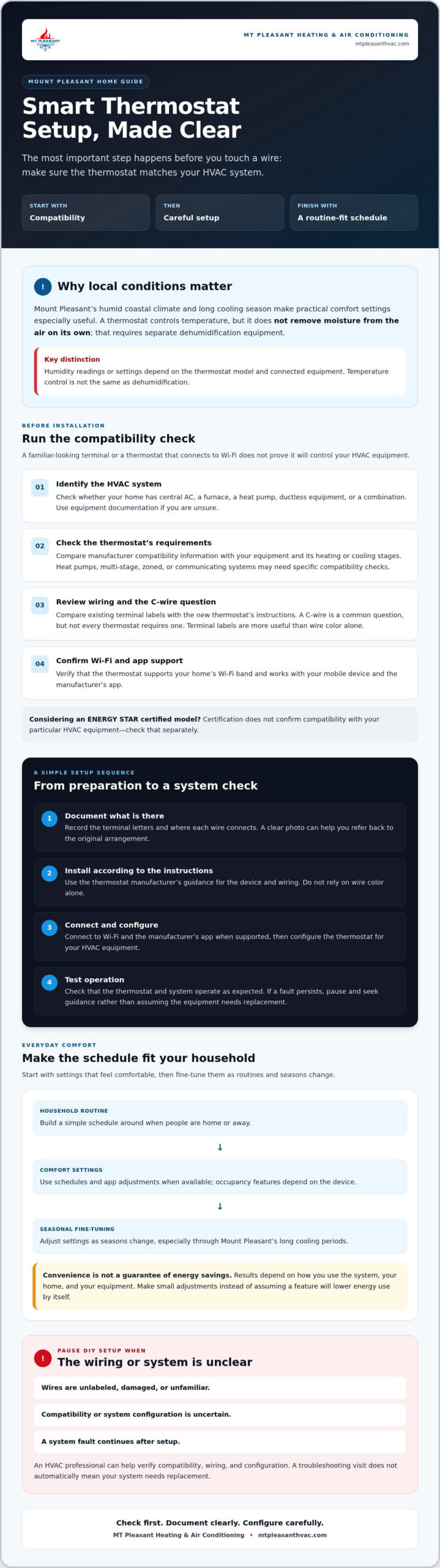
Smart Thermostat Setup Checklist
Save this list and tick it off as you go:
- Confirm your system type (heat pump, furnace with AC, or dual fuel) and that the thermostat supports it.
- Turn off power to the HVAC system at the breaker.
- Photograph the existing wiring and label each wire by its terminal letter.
- Check for a C-wire, or plan for the adapter your thermostat maker recommends.
- Mount the base level, connect the wires, and attach the thermostat.
- Restore power and follow the on-screen equipment setup, choosing heat pump and auxiliary heat options carefully.
- Connect to Wi-Fi and finish setup in the app.
- Test cooling, heating and fan, then set your schedule.
Still choosing a model? Compare smart vs. programmable thermostats or read our Nest thermostat review. Prefer to have it done for you? See professional thermostat installation.
Set Schedules and Troubleshoot Common Smart Thermostat Setup Problems
A schedule works best when it reflects how your household actually uses the home. Start with a few daily transitions: waking, leaving, returning, and going to sleep. Set temperatures that feel comfortable for your household, then observe how the system responds before adding more complicated settings.
Create a practical schedule for Lowcountry seasons
Mount Pleasant’s long cooling season makes it useful to revisit your schedule as routines and weather change. You might adjust cooling periods when the household’s daytime schedule shifts, then review the settings again as seasons turn. There’s no single schedule that suits every home. Comfort preferences, occupancy, and HVAC equipment all matter.
After changing a schedule, check whether rooms feel comfortable and whether the system operates as expected. A thermostat may offer humidity readings or settings, but humidity management depends on compatible equipment and controls. A thermostat alone doesn’t dehumidify the air.
What to check when the thermostat does not behave as expected
If the app won’t connect, first check the home’s Wi-Fi connection and the thermostat’s connection status. Then confirm the selected system mode, schedule, and temperature setpoint on the thermostat itself. Review the manufacturer’s troubleshooting instructions before changing more settings. A mismatch between the app and thermostat display may point to a connection or configuration issue.
- Blank display: Check the manufacturer’s guidance and any safe, user-level checks it recommends. Don’t remove the thermostat or handle wiring to investigate power unless you’re qualified and can safely isolate it.
- No heating or cooling: Verify the selected mode and setpoint, then check whether the system responds as described in the instructions. If some rooms receive little or no airflow, it may also be worth understanding what is a damper in HVAC and how it affects airflow to rule out a ductwork issue. If you’re unsure whether the problem involves a single damper or a broader airflow distribution issue, reviewing the difference between an AC damper and HVAC zoning can help you ask the right questions before calling a technician.
- Unexpected cycling: Note when the system starts and stops, along with the thermostat settings. Persistent cycling needs professional diagnosis rather than repeated schedule changes.
If the thermostat controls a heat pump and its behavior seems tied to heating or cooling operation, consult this Mount Pleasant heat pump service guide. For persistent cycling, incorrect heating or cooling, or uncertainty about wiring, stop adjusting settings and arrange thermostat service. Ask about thermostat service if you need help checking the control or system configuration.
When to Call a Mount Pleasant HVAC Professional for Smart Thermostat Setup
DIY setup should stop when you can’t clearly match the thermostat instructions to your home’s wiring or equipment. Continuing to guess may leave the system incorrectly configured or unable to respond as expected. For smart thermostat setup mount pleasant homeowners can handle straightforward steps themselves, but there’s no need to push ahead when a connection or setting is unclear.
Signs setup needs HVAC expertise
Ask an HVAC professional for help if the wiring doesn’t match the thermostat’s diagram, you can’t verify that power is off, or the thermostat reports a persistent fault. Complex heat-pump controls, staged systems, zoning, and communicating equipment can also require system-specific setup. Leave unfamiliar or mismatched wires untouched rather than trying different terminals.
Pay attention to what the system does after installation. Repeated short cycling or heating when you’ve selected cooling could point to a configuration issue or a problem elsewhere in the system. Check the thermostat’s displayed mode and review its troubleshooting instructions, but avoid repeated adjustments if the behavior continues. A clear note of the settings selected and what the equipment does can help a technician investigate.
What to expect from local thermostat service
A service visit can help establish whether the thermostat is compatible and configured for the equipment. A technician can check the wiring and connections, review system settings, and observe whether heating and cooling respond as expected. This helps distinguish a thermostat setup issue from a separate HVAC fault. If uneven airflow between rooms is part of the concern, a technician may also check whether HVAC dampers are correctly positioned to distribute conditioned air properly.
That assessment doesn’t mean you automatically need a new thermostat or HVAC system. The right next step may be an adjustment or repair, depending on what the checks show. If a fault persists or the equipment behaves unexpectedly, pausing DIY work and getting the system assessed can prevent more guesswork.
For help with thermostat setup or HVAC troubleshooting in Mount Pleasant, you can contact MT Pleasant Heating & Air Conditioning and ask about thermostat service. Share what type of system you have, what you’ve already checked, and any error message or unusual behavior. That gives the conversation a useful starting point without assuming a replacement is needed.
Frequently Asked Questions
Can I install a smart thermostat myself in Mount Pleasant?
You may be able to install a smart thermostat yourself if it’s compatible with your HVAC system and you can follow the manufacturer’s instructions carefully. For smart thermostat setup mount pleasant homeowners should first confirm the wiring and equipment requirements, then safely turn off HVAC power at the appropriate disconnect or breaker. Stop if you can’t verify power is off, identify the wires confidently, or match connections to the instructions. An HVAC professional can help check compatibility and configuration.
How do I know if my HVAC system is compatible with a smart thermostat?
Check the equipment type, existing thermostat terminal labels, and the new thermostat’s specifications before buying. Identify whether the home has central AC, a furnace, a heat pump, or ductless equipment, and compare the labeled connections with the thermostat’s compatibility guidance. Wire color alone isn’t enough to confirm a match. If your home has staged, zoned, communicating, or otherwise complex equipment, ask the manufacturer or an HVAC professional to verify compatibility.
Does a smart thermostat need a C-wire?
Not every smart thermostat needs a C-wire. Requirements depend on the thermostat model and the HVAC system, so check the manufacturer’s compatibility guide before purchasing or starting installation. The C-wire, or common wire, can provide continuous power, but some thermostat models may support other arrangements. Don’t assume an unused wire is a C-wire or connect wires based on color. If you can’t identify the terminals or instructions clearly, get qualified help before proceeding.
Can a smart thermostat work with a heat pump?
Yes, some smart thermostats work with heat pumps, but the specific model must support your system’s configuration. Check its compatibility information and setup instructions for the reversing-valve and auxiliary-heat settings. These controls help determine how the system switches between heating and cooling and uses supplemental heat. If the options don’t match your equipment documentation, don’t guess. A technician can confirm the configuration and help prevent incorrect operation.
Why is my smart thermostat not connecting to Wi-Fi?
First check that your home network meets the thermostat’s Wi-Fi requirements and that the signal reaches the thermostat’s location. Re-enter the network name and password carefully, confirm the thermostat appears in the manufacturer’s app, and follow the maker’s troubleshooting steps. Some models support only particular network bands, so verify this in the product instructions. If other devices also can’t connect, the issue may be with the home network rather than the thermostat.
Need a hand with this? Mount Pleasant Heating & Air Conditioning has served Lowcountry homes and businesses since 2007, with 24/7 emergency service.
Call (843) 714-0863 or request service online. Related service: thermostat services.